iPad for Marketing App review – Yahoo! Livestand
Like so many others, I expected Yahoo!’s new Livestand iPad app to give Flipboard and the other personalized magazine and news apps a run for their money. And, Livestand entered the race with every conceivable advantage. Yahoo’s MyYahoo! property is the world’s most popular personalized information portal and RSS reader. And as the web leader in sports and finance, Yahoo has a vast, popular store of original and syndicated content. Yet, sadly, Livestand falls short.
It’s not all bad. The fit and finish are crisp. Yahoo! obviously exploited the talents of a truly pro team of graphic designers. The layout is clean, open, and airy, and the graphics are fresh and interactive. The display is split horizontally to accommodate a half-pane, swipe-to-browse visual menu. There’s very little verbal clutter – just topical pictures to browse.
 Users can log in either using Yahoo! or Facebook accounts. I’ve been a Yahoo! user long enough that there’s lots of personal fodder on my MyYahoo! page: sports teams, weather, news groups, favorite modules. So I expected the personalization to be pretty good. I was disappointed by the content Livestand thought I’d like. Sports and parenting? Yes. But motor cyclist? Not even close.
Users can manually tune the personalization by adding subscriptions to blogs and magazines. Livestand presents a list of categories, including arts and culture, sports, news, and politics. Within each category, Livestand offers a choice of blogs and magazines. Choose a magazine and it’s stored in My Library. Choose a blog and it’s stored in the Personal Mix. It’s not clear why Yahoo! decided to split content this way. 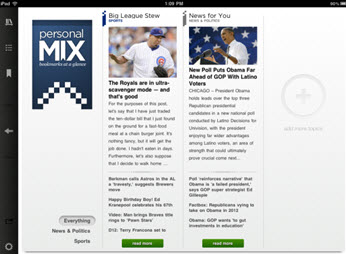
Disappointingly, I not only had to manually tune my interests, but the basics as well. Since I logged in via My Yahoo!, I thought Livestand would at least know my location for things like weather. Not so. The app offered to grab a forecast based on the location fed from my iPad. When I declined, it didn’t display my default location but instead panned through various locations nationwide.
 Publishers should note that Livestand has no information on getting your digital content to the app. Your customers can’t even add your RSS feed. Livestand seems to rely solely on the subscriptions users add to their Personal Mix. If your content is featured and someone selects it, you’re one of the lucky ones. But your customers can’t keyword search for content.
For marketers interested in tablet apps, Livestand is worth a look for the advertising, as it is the first of the tablet news aggregators with ads. Our friends at Toyota are currently running an ad on Livestand for the new Prius V. The ad is visually appealing and integrated well into the Livestand content. To see the complete ad, readers simply “tap to expand.” It’s a nice use of the tablet environment. While the ad is expanded, readers can “tap to animate” to learn more about the car in a whimsical game-like environment. Unfortunately the fun (and HTML 5) ends when you click through and land on the generic Prius page on the Toyota mobile site.

 Overall, aside from having a promising ad-revenue-based business model, the app just doesn’t make sense. Livestand clearly doesn’t know a whole lot about me that I don’t tell it manually. And while it’s laid out neatly, the app really isn’t that intuitive to access or use. In short, Livestand fails to deliver on its promise.
The Final Verdict
The reader experience: C. It’s functional and pretty for users looking to browse content in pre-selected areas of interest. The depth of content is impressive. But for all that Livestand should know given its access to My Yahoo! and Facebook accounts, the apps is not really personalized.
The publisher experience: D. If your content is mainstream, it’s more likely to be picked up by Livestand. But if your content is something users have to search for, good luck.
iPad for Marketing App Review – News360°
 News360° is a next-generation news app designed for a truly personalized experience. While it’s nothing new to tune an app to search and prioritize news through the “Settings” feature, News360° is one of the first to translate social media “likes” and “dislikes” into an actionable news filter.
News360° is a next-generation news app designed for a truly personalized experience. While it’s nothing new to tune an app to search and prioritize news through the “Settings” feature, News360° is one of the first to translate social media “likes” and “dislikes” into an actionable news filter.
Readers tap the “Settings” menu to sync News360° with social media, bookmarking, and RSS reader sites, including Facebook, Twitter, Evernote, Google Plus, Google Reader, and more. When I synced with Google Reader, News360° automatically pulled topics into the “My Interests” area for aggregation with the topics I’d already chosen within the app.
 Now, privacy-patrollers alert: readers can opt-out of the social media integration at any time and create an account the “old-fashioned” way using an email address and password, then tinkering with the “My Interests” to tune feeds.
Click on a news story and up pops a headline and leading paragraph or two. Swipe down to open the actual source article. Going back and forth between app and source article is seamless, and navigation is easy.
 Really cool: Readers can switch to 360° view and browse images, no words, as they scroll left and right. Tap one that’s intriguing and the article title and source appear. Choose to read more or keep scrolling other choices. If readers stop moving the screen, the scrolling restarts and automatically refreshes the image list of stories. It’s a great way to meander through stories.
Unfortunately, all the slick functionality came to a screeching halt when I tried tuning the app manually under “My Interests”. It’s easy to set up new categories, either by clicking on their palette of existing categories, such as Travel, Education, Military, Markets, MLB Baseball, etc.; or, by typing in a keyword. Problem is, sometimes choosing a category abruptly closes the app. Or choosing multiple topical areas causes the app to layer the icons one atop the other in a blurred mish-mash of text and images. And the custom feed I set up to test “healthcare” failed to populate anything but a “come back later” sign after 24 hours. I found this hard to believe, given the prevalence of healthcare reform discussions daily, so checked on the News navigation bar under “Health” and there was plenty of content. Disappointing that my preferences are slow to load, if they did at all – feels like a letdown after the promise of über-customization.
Digital marketers should note that searches are limited to keywords and topics. The searches I tried by feed URL came up with no matches. So getting to your content is a two-step dance, at least.
 There is a back-door way, though, to add to “My Interests” – and it’s clean, easy to use, and worked well. Just tap the search icon and up pops a menu of topics, objects, sources and articles. Select one you like and tap “Add to My Interests” to organize into a new or existing category.
Unfortunately, as with so many of these iPad news apps, News360° hasn’t seemed to catch on that they should be talking to publishers. There’s no publisher-focused info on the News360° website or in the app itself. What’s clear however, is that if you’re using social medial to engage customers, your content has a better chance of finding the iPad apps your customers increasingly use every day.
 The Final Verdict
The reader experience: B. It’s an intelligent concept and the navigation is slick. Once News360° gets “My Interests” to work, it’ll approach A-range quality.
The publisher experience: B+. If your feed’s out there, News360° can deliver it. But your customers may have to add your feed to Google Reader first.
iPad for Marketing App Review – Feedly
Feedly has been in the reader game for a while—and it shows. It started as a browser-extension RSS reader for Firefox, Chrome, and Safari. Now, it’s a free native iOs app (one of the few in the space) built for iPad and iPhone. There’s also a version that works on Android phones and tablets.
Feedly is simple and cleanly designed—and doesn’t leave you wanting more. It lets you quickly browse through your feeds, yet borrows some of the visual appeal of magazine-style readers. And it includes some of the personalization magic that makes readers like Zite so appealing. 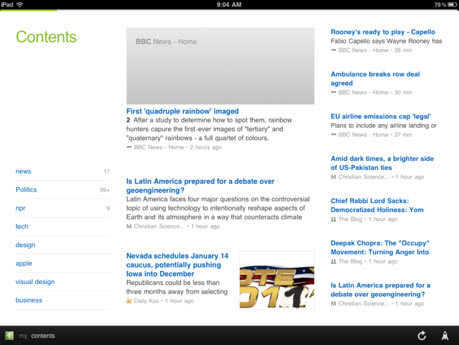
While it’s powered by Google Reader, Feedly serves up cool content before you even sign into Google. It’s loaded with “essential” articles in categories that span from tech, business, and world news to cooking, do it yourself, and gardening. You can navigate content via the contents menu on the home page (aptly called My Feedly) or tap “my contents” on the bottom menu, which opens a sidebar on the right of the screen that displays all feeds and topic areas. Feedly takes advantage of iOS, letting users swipe down, for example, to mark all as read or swipe up to keep as unread. 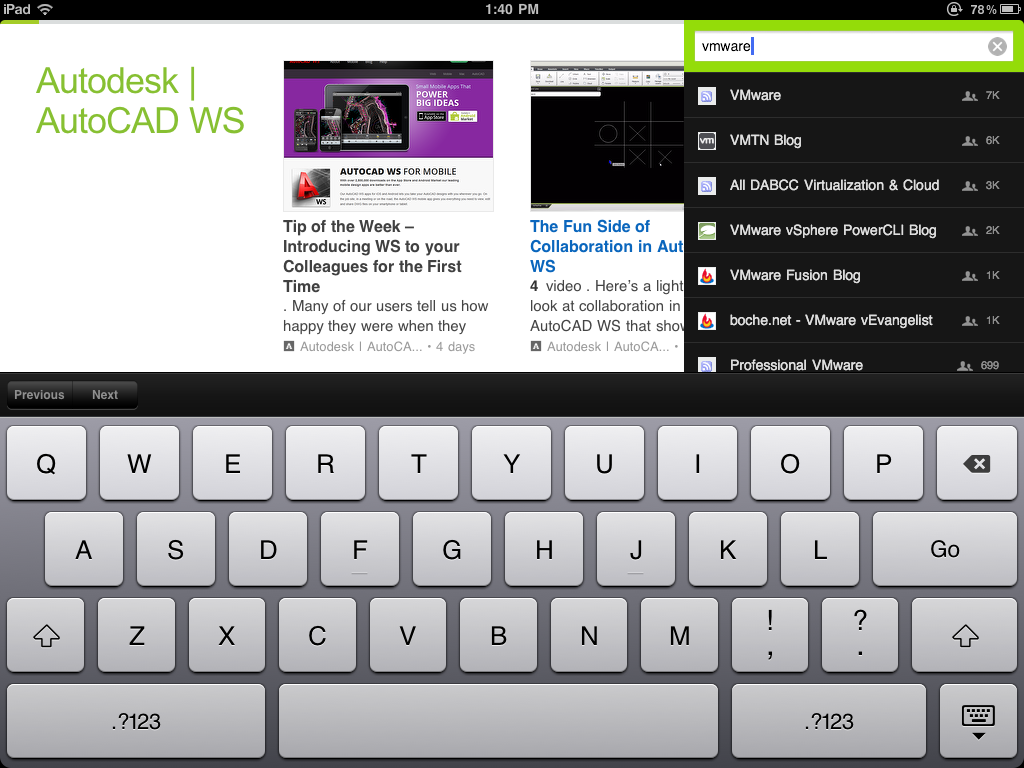
You can also search for additional sources by name or URL and choose between black and white themes.
Feedly syncs with Google Reader almost instanteously, faster than any other iPad reader app I’ve used. I added feeds on Google Reader and when I looked down at my iPad a second later, they were already there. That speed will probably appeal to feed-geeks who love now love Reeder (yet pay for it). Read items in Google Reader and they’re marked as read in Feedly (across all their platforms) and vice versa.
And, like Reeder, Feedly has the functionality you want in an RSS reader. It’s easy to like, save, email, Tweet, or post an article to Facebook. You can even log in with your Tumblr account to access your dashboard and read and like articles.
Despite its simplicity, Feedly doesn’t feel quite as stark as Reeder. The user experience echoes magazine-style readers like Flipboard as you swipe to navigate and you can add content independent of Google Reeder. Feedly also recommends new content with its “you might also like” suggestions. While this personalization isn’t as robust as Zite’s, it’s a cool way to discover new content.
 Like so many of these reader apps, Feedly doesn’t do a great job (or any job) providing information for publishers. I could find any publisher-facing information on Feedly’s website so it’s unclear how you’d get your company onto the “essential” A list. And yet the essential categories provide the richest content—both written and visual—and the best user experience.
Publishers can enhance the reader experience (making feeds visually similar to “essential” feeds) by including images in their feeds. 
For digital marketers, Feedly is yet another promising channel for reaching prospective and existing customers looking for information and news on your company—and topics related to it. Your only to-do: get your content into RSS format so that it can find its way to apps like Feedly.
The Final Verdict
The reader experience: A-. It’s clean, easy to navigate, and essential sections are beautiful.
The publisher experience: A-. Your customers should be able to read your feed either by adding it to Google Reader or searching for it within Feedly. If Feedly provided insight into how to make the essentials list, I’d bump it to a solid A.
iPad for Marketing App Review: AOL Editions
AOL’s 2011 first quarter earnings weren’t exactly impressive. Arguably, the sole bright spot was the 4 percent growth in online display advertising revenue. Reinventing itself as a content provider, AOL is struggling to find its feet, though Tim Armstrong, the company’s chief executive, insists that the company is on its way up. Buying the Huffington Post and TechCrunch may have been AOL’s first big move to burnish its content provider image. The launch of AOL Editions, the latest personalized news magazine for the iPad, may be the second.
Like Zite, Editions claims to be the magazine that “reads you” – learning what you like so that it can deliver personalized content (which can include content from AOL properties such as Huffington Post and nonaffiliated content). Like the other iPad news magazines, it’s easy to share articles via email, twitter, and Facebook. 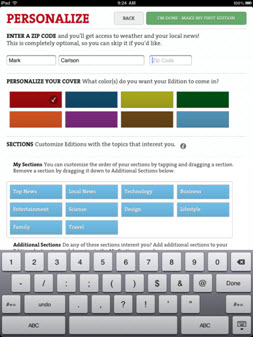
It took me several attempts to set up the free app; it timed out the first time I tried to connect to Facebook. Editions claims that connecting to Facebook, Twitter, or AOL/AIM will improve customization. The second time I entered my Facebook credentials, it took – 30 seconds later.
After choosing a social network (or choosing not to connect to a social network) readers enter their zip code and select 10 sections from a list that includes topics such as Top News, Technology, Business, Entertainment, Sports, and Local News. Then, the app assembles the magazine – it took several minutes to build my first edition.
The “cover page” of the magazine resembles old-school magazines, complete with a mailing label and a lead article written large. [l1] The following page includes the date, local weather, cover article picture and title, and a calendar, presumably pulled from iCal. Next up is the table of contents, which allows readers to view and jump to each section. 
After that, the reading experience doesn’t differ much from that of Zite and Flipboard. Readers can read the magazine “cover to cover” or navigate to articles in a few different ways. They can jump to a specific section by tapping it on the table of contents or chose the section from the Sections menu item at the bottom of the screen. To see all articles in the magazine, readers tap the Articles menu item, which launches a scrollable sidebar that lists each section and the articles in it.
When readers open a story, the app displays terms associated with it. For example, when I opened an article on Rick Perry’s presidential bid, the terms included Federal Reserve System, Texas, Prayer, Republican Party, and The Republican. Readers let the app know which terms they like and which they don’t by giving each a check or an X. They can also give a thumbs up or down to the content source, such as TheAtlantic.com. 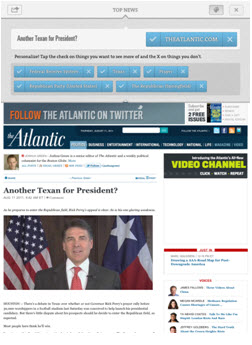
Readers can take a more active role in personalization by adding sources (none that require a paid subscription, such as New York Times) or interests. They can even choose to track products or companies. But if the product or company – say SimpleFeed – isn’t on the list of available sources, they’re out of luck. 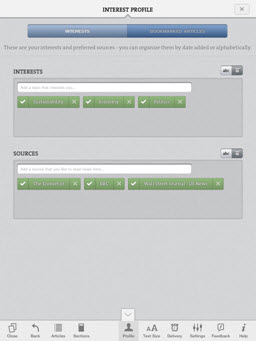
Editions may run into some real trouble with its “daily magazine” concept. Because the app refreshes content only once a day, articles may feel stale by the time they appear in Editions. Even in the 24-hour news cycle, traditional magazines can allure readers with in-depth stories. Readers don’t expect the New York Times to have New Yorker style articles. However, for all it claims to be a magazine, Editions pulls articles that are, for the most part, news-style articles. And everyone expects news-style articles to be fresh.
There’s also bad news for digital marketers that want to get their company’s content to Editions users. There’s no way for readers to add your company’s RSS feed to their Editions magazine. You can hope that by developing rich RSS content and creating lots of buzz around it, Editions’ algorithm will snag it. AOL doesn’t seem too concerned about catering to content publishers (ironic for a company trying hard to get ahead in the content game). I couldn’t find any information on the Editions website or AOL help for Editions tailored for publishers. Even so, it’s clear that iPad apps like Editions are changing the paradigm for content consumption – and that means that you need to deliver it in the RSS format they utilize.
The Final Verdict
The reader experience: B. Editions doesn’t offer anything truly different, other than a few old-style magazine design elements. And while the personalization is cool, it doesn’t match Zite’s for effortlessness.
The publisher experience: D. Like Zite, Editions need to give users a way to add specific RSS feeds. Right now, Editions holds all the cards in determining which content a user will see – and which companies and products they can follow. However, if you create buzz around your company blog, your content has a better chance of reaching Editions users.
Finally! “Save to” comes to iPad RSS Readers
Obviously we are enthusiastic about tablet apps as a marketing channel. Of the top ten free and paid iPad News Apps, six are primarily RSS aggregators. That is amazing given that it is nearly impossible to subscribe to specific content in these apps. Customer typically view your content through syncing with Google RSS Reader, which is not a user friendly experience.
 Yesterday Pulse began breaking down this wall by adding a “Save to Pulse” bookmarklet. Best of all it is really simple.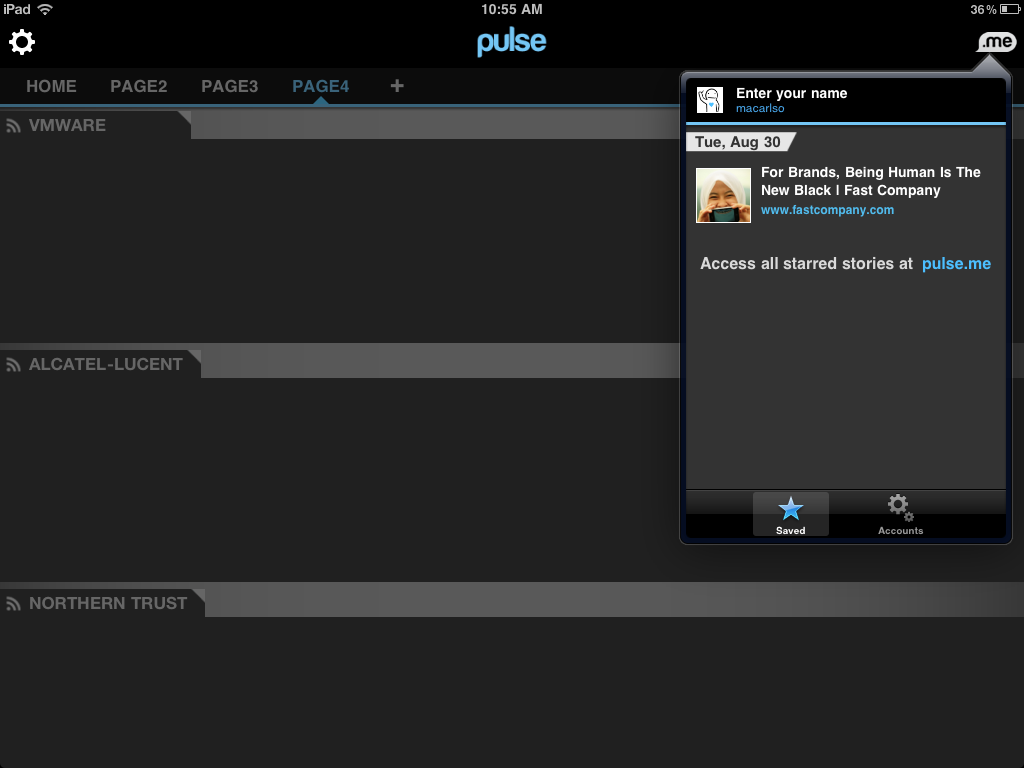
Drag and drop the bookmarklet from this page to your browser bar. When you find interesting content, click the button. Next time you fire up
Pulse, that article at the top of you content queue. Nice!
As the ReadWriteWeb points out, a bookmarklet approach to a challenge for consumer adoption. This feature is getting media attention because it is such a glaring need. An “Add to” button would put the onus on the publisher resulting in much easier adoption.
iPad for Marketing App Review: Reeder
Google Reader users love Reeder for iPad, a year-old RSS feed reader. It’s clearly designed for RSS feed junkies who want to browse through all the latest news and information on topics they care about. Reeder is not a glossy, pretty magazine-style app. But I don’t think that matters much to people looking for a cleanly designed RSS feed reader. Using Reeder for iPad – and its sister Reeder for iPhone – has easily saved me an hour a week. Reeder for iPad has attracted a loyal following and garnered 4.5 stars on iPad. Here are a few reasons why.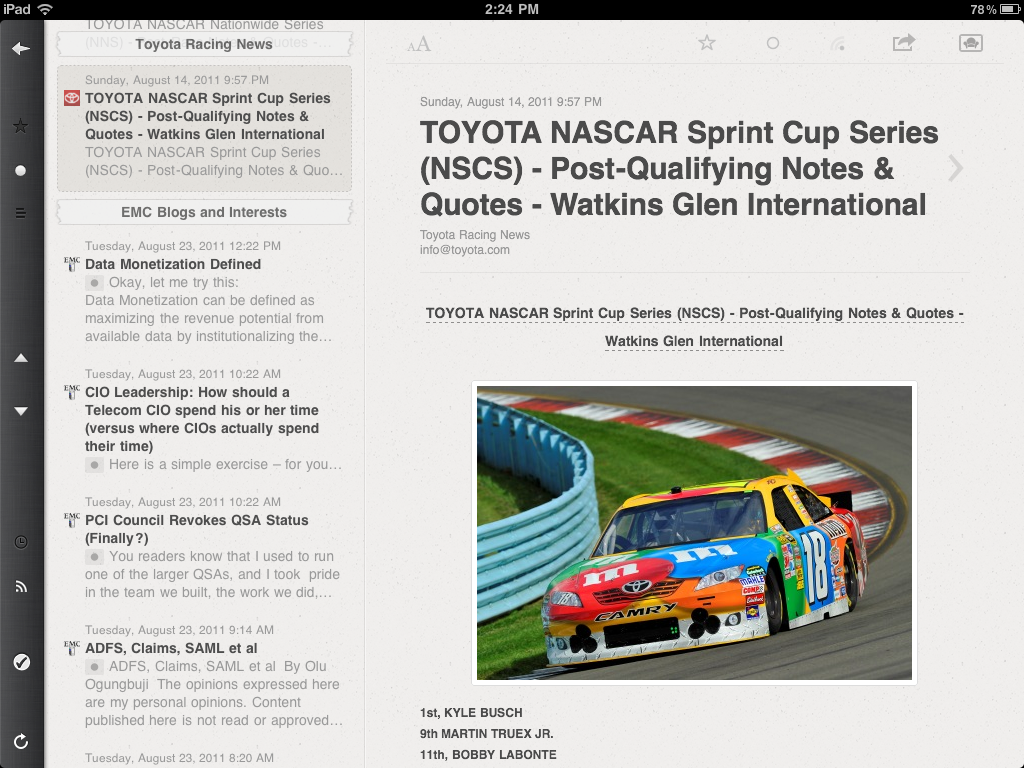
First, it exploits iPad usability to improve the news-grazing experience. Gizmodo got it right when it said, “Its biggest accomplishment is solving the simple problem of making it easy to move through news items.” In that regard, Reeder clearly caters to hardcore RSS feed enthusiasts like me.
Arrows on the sidebar are perfectly positioned to scroll quickly through articles (the summary appears on the left third of the screen, the highlighted article displays on the other two-thirds). If you tap the article, it takes you to the source. A back arrow at the top of the screen makes it easy to return to the article list, and sidebar icons let you quickly change what you view. You can choose to show only starred items, unread items, or all items. It’s easy to group articles by date or feed, and mark all as read.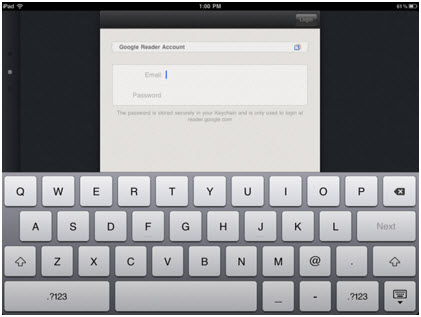
Another reason people love Reeder is that it syncs with Google Reader quickly and seamlessly. On start-up, it took under 30 seconds for Reeder to grab all my Google Reader feeds. That initial grab complete, it now syncs in about a second. If you read an article in Reeder, it’s marked as read in Google Reader and vice versa. This seamless syncing means you can consume feeds much faster. Sure, you could read RSS feeds for free by visiting www.google.com/reader via the Safari web browser or by downloading Google’s free iPad and iPad reader apps. But many people are choosing to pay $4.99 for Reeder because its caching significantly speeds the experience, especially when you’re relying on a mobile phone data network. In fact, Reeder’s popularity consistently earns it a place on the “Top Paid iPad Apps” list in the news category. And that’s no small accomplishment for an app developed for the fastest growing computing platform.
Finally, Reeder does what all good RSS readers should do: it allows for easy sharing (Facebook, Twitter, email) and bookmarking (Instapaper, Delicious, ReadItLater, Pinboard, Zootool). It takes just a few clicks to share an article virtually any way you want. 
If you’re a digital marketer, you can’t afford to ignore the proliferation of apps such as Reeder. Prospective and existing customers looking for information and news about your company will increasingly expect to access it any way they want, including from their iPads. And because more and more apps are publishing RSS content, it can insure you against device and app lock-in. You don’t have to develop content for a specific device or app; but rather provide content in the RSS format that many of the new apps utilize. Why not let the apps do the heavy lifting?
The Final Verdict
The reader experience: A-. It’s not beautiful, but it is clean and easy. RSS feed enthusiasts will appreciate how simple it is to navigate.
The publisher experience: B+. If you have an RSS feed, your customers can access it on Reeder by adding it to Google Reader. To boost its grade, Reeder would need to let users search for and add feeds directly from the app, instead of forcing them to do it through Google Reader.
iPad For Marketing App Review: Zite
With its March 2011 launch, Zite is one of the latest personalized magazines for the iPad. While it doesn’t have nearly the same polish as Flipboard, it’s an interesting app that could catch up quickly. Zite’s competitive differentiator is the automated algorithm it uses to find articles it thinks a reader will like. It’s clear that Zite has taken note of Pandora’s successful approach to personalization. Pandora set the standard for delivering content – music – based on user preferences. Zite shares the attributes that have made Pandora so popular: easy set up, near effortless personalization, and an element of discovery. Both Zite and Pandora deliver content that their users will like – but might not have found on their own.
When a reader loads Zite for the first time, it asks for access to his or her Twitter, Google Reader, Delicious, and Read It Later accounts. It checks out their profile along with the people and sources they follow to get a bead on their interests. Presumably, the greater access you give Zite to these services, the better content you’ll get in return.
I gave Zite access to my Twitter and Google Reader accounts and it seemed to help Zite pick which of its 2,000 topics to display on three screens. Not surprisingly given my interests, gadgets, sports, science news, business & investing, politics, and world news topics rose to the top.  You can also search for topics. I typed “travel” and got several interesting choices: travel blogs & tips, camping, time travel, backpacking, walking, and snowboarding. I added about 15 topics, including travel blogs & tips, tapped “Done,” and 10 seconds later had my personalized magazine.
One of the main differences between Zite and its competitors Flipboard and Pulse (see previous reviews) is that readers can’t ask Zite to grab a specific source, such as your company’s RSS feed. It doesn’t even take Google Reader feeds – it just uses them to learn reader preferences. However, it appears that Zite may let readers add specific sources in future versions. Zite CEO Mark Johnson commented on a review about the issue, “That’s something we’re pursuing in future versions, so keep on the lookout!”
Readers can view articles in “web” and/or “reading” mode. While reading mode is certainly cleaner and more pleasurable, some publishers insist that Zite display their content within the context of their websites. As with Flipboard and Pulse, it’s easy for readers to share articles via Twitter, Facebook, email, Instapaper, Delicious, and LinkedIn. They can also use the Read It Later app to save it or use Evernote to create a clip of the article. One of the most valuable features, however, is the ability to rate articles. The Zite algorithm takes into account a user’s ratings to refine reader preferences. Thus, the personalization gets better as you rate articles. 
So, how does Zite impact your digital marketing efforts? It underlines the importance of developing rich online content and engaging with customers through blogs. Remember, the more buzz there is around specific content, the more likely it’ll be picked up by apps like Zite. The increasing popularity of such applications – and the fact that they deliver content targeted to people’s interests – underscore their potential as a marketing channel. These applications make it easier for existing and potential customers to find you. If they love gadgets and your gadget company invests in building a gadget blog that captures the imagination of the blogosphere, then it’s likely that apps like Zite will deliver your blog content to the very gadget lovers you want to reach.
The Final Verdict
The reader experience: A-. Simplicity wins out. The design could use some polish, but I actually enjoy how simple it is to read and navigate Zite. The near effortless personalization makes this app one to watch.
The publisher experience: D. I’ve no doubt that I’ll revise this once Zite allows readers to add specific RSS feeds. Right now, the only way to get your content to Zite readers is to invest in building buzz around it.
iPad for Marketing App Review: Pulse News
The Pulse News reading application is just that: a nice interface for snacking on news you choose. The app is rapidly gaining traction, growing its user base from 200,000 in November to more than four million today. It’s also one of the apps in the App Store Hall of Fame. Pulse is one of the few cross-platform news reading apps. It’s factory installed on the Samsung Galaxy Tab and available for the iPhone. Last month Pulse announced it secured $9 million in series A funding. While the amount is well short of the $50 million recently raised by rival Flipboard, it signals that Pulse News is a serious contender in the space.
 While the magazine format of Flipboard invites readers to sit down and enjoy a cup of Joe while flipping through content, the Pulse reader seems better suited for nibbling news. The filmstrip UI lets readers quickly zip through stories from each content source. To refresh, readers simply pull the strip all the way to the right and then let it snap back. A pretty cool UI touch.

When readers tap a story, Pulse provides a summary in a split screen. Tap either the article title again or the “Web” tab at the top of the article to display the original article in a web browser (still within the Pulse app). After enjoying Flipboard’s beautifully rendered pages, I felt a little cheated that Pulse gives the same browser reading experience as a PC – except in a nice, tidy iPad app wrapper. It makes Pulse feel a bit like an index, albeit a pretty one.
Even so, like Flipboard, Pulse offers another way for your company to reach its most engaged customers and prospects. If someone chooses to pull your company’s feed into Pulse, chances are they’re interested in what you have to say.
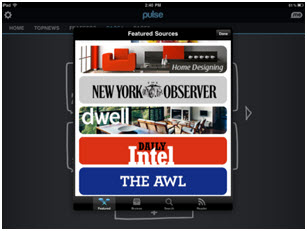
So just how does a reader get your company’s content into their Pulse app? Right now, readers can add and delete up to 60 sources on five configurable pages in a few ways. They choose from featured sources (Groupon, New York Observer, Apple News, Android News, Daily Intel, and more) or browse sources by category (Business, Entertainment, Fashion, Food, Gaming, News & Analysis, Politics, Social, Sports, and Technology to name a few). If readers want to find a particular news source, such as your company blog or Twitter feed, they can search by feed URL (a distinct advantage over Flipboard) or by keyword. The search quality is okay, but not great. I had trouble finding a few feeds. However, readers that don’t find the content they want through the search capability can pull any RSS feed they want into Pulse from their Google Reader.
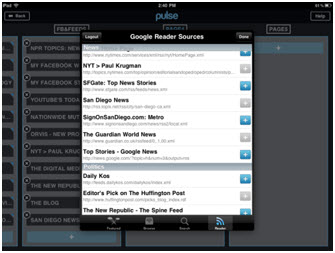
In short, if your company has an RSS feed, it’s accessible to the rapidly growing Pulse user base. How you become a featured source is unclear. Pulse’s website provides an email address for publisher queries, but no information on partnerships.
The Final Verdict
The reader experience: B. While the filmstrip and split screen concepts are cool, I didn’t enjoy reading the original web page. I expect an iPad app to take better advantage of the platform.
The publisher experience: B+. Pulse seems focused on consumers, not publishers. However, because Pulse is a true RSS reader, if you have an RSS feed, you’re in luck.
iPad for Marketing App Review: Flipboard
Flipboard is a personalized social media magazine for the iPad that pulls content (mostly) from RSS feeds. Readers can add content personal to them: Twitter, Facebook, Google Reader, and the news, people, blogs, and topics that pique their interest. Flipboard renders photos, callouts, and other design elements, sprucing up the reading experience. Readers can easily flip through articles and photos, comment on posts, and like or favorite what they read. I have to say, Facebook content has never looked so good. I love seeing photos and quotes from my friends splashed across the gorgeous iPad screen. 
It’s not surprising that between March and May, Flipboard tripled daily usage – from three to four million flicks (turning the “page” in the app) per day to eight to nine million flips. Apple named it an iPad App of the Year and TIME called it one of the top 50 innovations of 2010.
The point is that the Flipboard app has legs – and it’s a viable marketing channel. It’s social, personal, and reaches a captivated, engaged, and self-selecting audience. And that means that your company should consider making its content available to Flipboard readers. For example, if you make 3D design software, you’ll want designers to add your 3D design blog to their Flipboard magazines.

Autodesk Labs RSS feed offers insight into this 3D design software company
Readers can add your company’s content to their Flipboard magazines in a few ways. First, they can search for corporate blogs, Twitter users at your company, Twitter lists, and people related to your company. Unfortunately, readers can’t type in a specific RSS feed URL – and the blekko technology powering Flipboard’s RSS search capability is a bit spotty. When I looked for feeds, the search found them only about half the time. Hopefully this functionality will improve over time; it was integrated into Flipboard just a few months ago. 
Second, readers can also access your content via Google Reader. They simply choose what Google Reader sections they want to add and it’s pulled into Flipboard. It includes photos and images from the original feeds and looks just as compelling as content designed for Flipboard.

Finally, you can also get content into Flipboard by joining the ranks of those select publishers listed in Flipboard’s featured content section or in the other categories (magazines, news, business, tech & science, cool curators, art & photography, design, living, entertainment, sports, travel, food & dining, and style). Presumably, these publishers – from the Dalai Lama and Oprah to Rolling Stone and Houzz – are Flipboard partners. On its website, Flipboard notes that publishers can design their content for Flipboard. Flipboard Pages, a lightweight JavaScript engine parses content and lays out articles in their template optimized for the iPad. But unless you’re one of Flipboard’s select partners, you can’t use Flipboard Pages quite yet as they are not ““ready for a wider group of publishers to try this out.”
The Final Verdict
The reader experience: A. Flipboard presents content in a beautiful, compelling way and it’s fun to navigate.
The publisher experience: B-. Hopefully I can revise this grade soon. Flipboard doesn’t make it easy for publishers to learn about publishing to the app (the Flipboard website is quite light). Right now, it appears that only top-tier publishers are publishing directly to Flipboard. The good news is that as long as your company has an RSS feed, your company’s content may be found via Flipboard’s RSS search capability or accessed via Google Reader.
Tablet Apps: Your New Marketing Channel?
There’s no doubt that tablets are rocking the digital landscape. Apple reportedly sold more than 25 million iPads in the last 14 months. Since the device’s launch, 90,000 iPad apps have been developed. And Apple is no longer the only player in the game, as the tablet parade at CES 2011 attests.
Last week, I attended MediaPost’s Tablet Revolution conference and listened to several companies present research and cases studies that validate this explosive growth in tablet computing.
Universal McMahon’s SVP Michael Haggerty shared some particularly interesting tidbits about the iPad.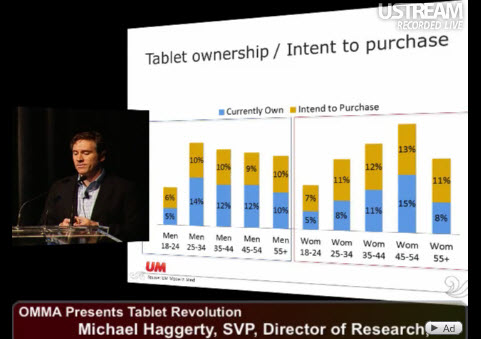
iPad owners are largely 25-54 year old men, but ownership among 35-54 year old women is growing fast and will likely drive the tablet category in 2011. Women enjoy the portability of tablets – and the fact that it allows them to jettison newspapers, magazines, and Kindles.
More than half of iPad owners use it several times a day, and 63% of iPads are used by two or more people. Unlike smartphones, which are very much personal devices, the iPad is a family gathering device, according to Haggerty. This certainly resonates with my experience. The iPad is in constant use by my family of five.
So what does this research mean for digital marketers? It means that as more people across a wider spectrum interact with tablets, the pressure to invest in this burgeoning channel rises. The question is: how?
Fidelity’s VP of Interactive, Chris Needham, has one answer: develop a tablet app – and use it to forge a more intimate connection with customers. Fidelity’s most attractive customers overlap nicely with iPad users (high net worth, engaged, younger). In Needham’s experience, the development process for the Fidelity app was less costly and much faster than web development.
The Fidelity app is making ROI targets and has been downloaded 700,000 times across iPhone, iPad, and Android devices. The company is getting good PR, NPS, and engagement rates on their app advertising program, with content-based ads garnering the best results. In fact, Fidelity plans to increase its iPad advertising spend in 2011 by 300% over 2010.
But developing an app and buying advertisements aren’t the only ways for digital marketers looking to interact with tablet users. Imagine marketing in this explosive channel without investing significant capital and time in app development. Over the next few months, I’ll review a range of existing iPad apps to explore how digital marketers can do just that.

 Behind The Feeds